Secure AI agent operations
on Gmail and Google Workspace
Sentry Proxy intercepts every request your AI agent makes to Google and enforces exactly the policies you define. Agents never see your Google credentials - they communicate through a purpose-built interface designed for their exact needs.
Free plan available · No credit card required · Unlimited queries
Google OAuth scopes are too broad for AI agents
When you grant an AI agent access to Gmail or Google Drive, you typically hand it full read/write access to your entire account. That's far more power than any agent actually needs - and a single compromised or misbehaving agent can read all your emails, delete files, or send messages on your behalf.
Sentry Proxy sits in the middle. It holds your Google tokens and gives agents a narrow, policy-scoped API key instead.
How it works
Three steps from setup to a controlled, auditable AI agent.
Connect your Google Workspace accounts
Sign in to the proxy with your Google account, then complete a separate Google OAuth flow for each Workspace mailbox you want to protect. The proxy stores encrypted tokens server-side. Agents never touch them.
Define what agents are allowed to do
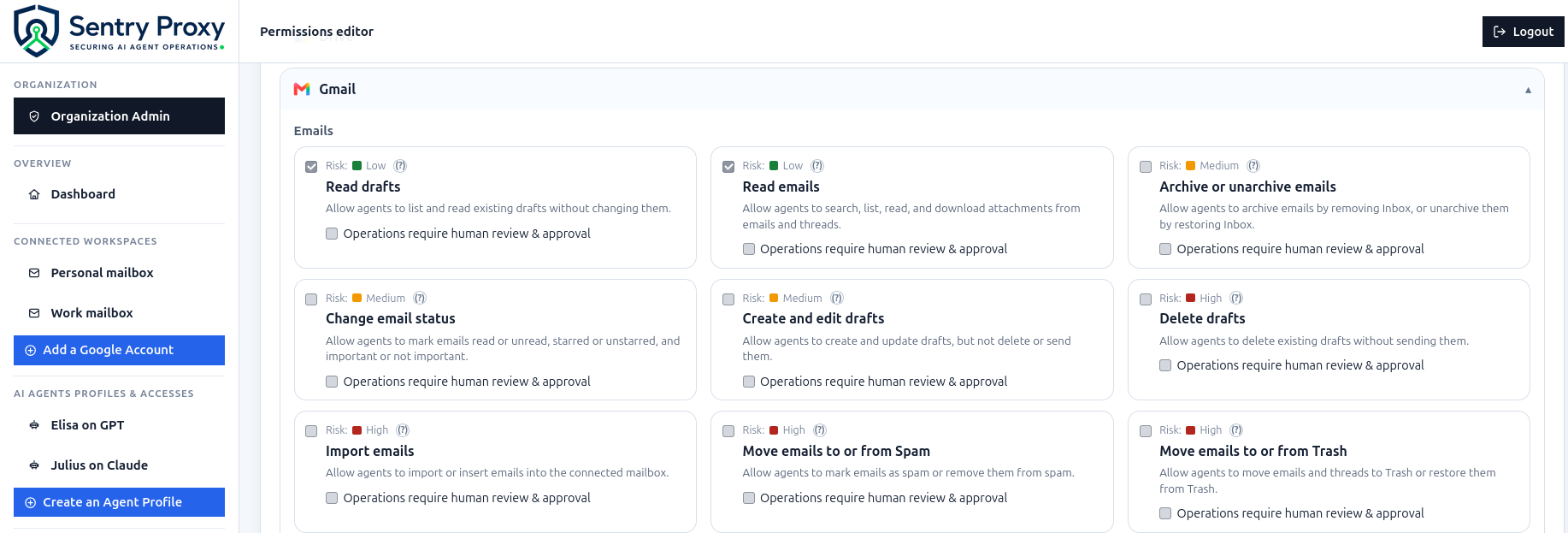
The Permissions editor gives you a catalog of fine-grained capabilities: read emails, create myself-only calendar events, list Drive files, and more. Each capability maps to exact Google API routes. Enable only what you need.
Create agent identities and distribute keys
Each AI agent gets its own proxy API key. Attach Workspace grants to control which accounts each agent can access, and apply a per-grant policy. Download a ready-to-install skill package for the agent to use.
Everything you need to run AI agents safely
Built specifically for the reality of AI agents accessing corporate Workspace accounts - not generic API gateway features.
Fine-grained policy enforcement
50+ capabilities across Gmail, Calendar, Drive, Contacts, Docs, Sheets, and Slides. Each maps to exact Google API routes - not blunt OAuth scopes. Enable read emails without enabling send.
Isolated agent identities
Each AI agent gets its own API key and profile. If an agent key leaks, rotate it in one click without affecting other agents. Agents are never given your Google OAuth credentials.
Drive folder restrictions
Register specific Google Drive folders. Agents can only read, create, or modify files inside those subtrees. The proxy caches the folder hierarchy and enforces it on every request.
Full audit log
Every request is logged: agent identity, Workspace account, Google API path, outcome, matched capability, and error message. Searchable with regex filters, paginated, and exportable as CSV or JSONL.
IP firewall per agent
Restrict which IP addresses (or CIDR ranges) are allowed to make requests with an agent key. Useful when your AI infrastructure runs from a known egress IP. Firewall checks ignore forwarded headers.
Human approval gates
Mark high-risk capabilities (like Send email or Delete files) as requiring human review. The proxy rejects any agent request for those operations unless it includes a human approval explanation header.
Organization admin panel
Multi-group organizations can define security policies, OAuth scope policies, and operation policy sets. Assign policy sets to groups of users so access controls are enforced consistently across the team.
AI agent skill packages
The proxy generates a zip package for your AI agent: a Python helper, Markdown docs scoped to the current policy, and a config file. The agent can self-update its skill when your settings change.
Risk-scored capability catalog
Every policy capability has a risk score. Standard users can only enable capabilities up to the maximum risk level their organization allows.
Read-only operations. Agents can observe without changing anything. The built-in default policy covers all Low-risk capabilities.
- List & read emails
- Read calendar events
- Search Drive files
- Read contacts
- Read Docs, Sheets, Slides
Reversible writes or read access to configuration and settings. Enable only when an agent's workflow genuinely needs it.
- Create myself-only calendar events
- Apply or remove labels
- Archive emails
- Create drafts
- Read calendar sharing rules
Operations that affect third parties, delete data, or are hard to reverse. Use human approval gates for these.
- Send emails
- Delete messages or files
- Create events with attendees
- Manage file permissions
- Permanently delete labels
50+ capabilities across Gmail, Calendar, Drive, Contacts, Docs, Sheets, and Slides. Organization admins can set a maximum risk level per user group.
Supported Google Workspace services
All capabilities are off by default. The built-in policy enables read-only access to the marked ones. Everything else requires an explicit policy decision.
 Gmail
Gmail - List & read emails and threads
- Read attachments
- Read & manage drafts
- Manage labels
- Send emails opt.
- Archive, trash, delete opt.
 Google Calendar
 - List calendars & events
- Read event details
- Create myself-only events
- Create events with attendees opt.
- Update & delete events opt.
- Manage sharing rules opt.
 Google Drive
 - Search & list files
- Read file metadata
- Export Workspace files
- Create, update, delete files opt.
- Manage permissions opt.
- Comments & replies opt.
 Contacts
 - Search saved contacts
- Search Google Other Contacts
- Search organization Directory opt.
- Create contacts opt.
- Update contacts opt.
- Delete contacts opt.
Docs, Sheets, and Slides are enforced through their own policy capabilities - separate from generic Drive file permissions.
Enabled by default in the built-in Read-only policy · Optional capabilities require a custom policy
Security model
Built around the principle that agents should only access what they truly need - and that every access should be auditable.
Tokens never leave the server
Google OAuth tokens are encrypted at rest with a 256-bit key. Agents receive a proxy API key - if it leaks, revoke it without touching Google credentials.
Policy enforced on every request
Every agent request is checked against an allow-list of exact Google API routes. No policy match = request denied. Body inspection further restricts label changes, calendar events, and file types.
Workspace ownership enforced
An agent can only access Workspace accounts explicitly granted to it by that account's owner. Cross-user access is impossible by design - the proxy verifies ownership before every resolution.
Request bodies are never logged
The audit log records what was asked (method, path, outcome, matched capability) but never stores request or response bodies. Sensitive email content stays out of the logs.
Minimal attack surface
The proxy only does one thing: intercept, validate, and forward Google API calls. No third-party cloud services in the critical path. Fewer moving parts means fewer places for things to go wrong.
Designed for internal deployment
Deploy behind Cloudflare Tunnel, a VPN, or Cloudflare Access. The proxy does not terminate TLS - pair it with a reverse proxy. Keep it off the public internet unless an access-control layer fronts it.
Known limitations - read before deploying
- · No native TLS termination - use a reverse proxy (Cloudflare, nginx, etc.)
- · No formal penetration test - review before production use
- · No built-in Okta / SAML support - use an external access layer for non-Google IdP
Get started in minutes
Start on the free plan today. Connect your first Google Workspace in minutes - no infrastructure expertise required.
Set up Google Cloud
Create a Google Cloud project, enable the seven Workspace APIs (Gmail, People, Calendar, Drive, Docs, Sheets, Slides), and create a Web application OAuth client.
Run the proxy
Copy the example config, fill in your Google credentials and encryption key, then start the proxy.
                      $ cp config.env.example config.env

                      # Fill in config.env

                      $ source config.env && make run
Connect a Workspace account
Sign in with your Google account, then click Add Workspace and complete the separate Google OAuth flow for the mailbox you want the proxy to manage.
Create an agent and download the skill
In Agent access, create an agent identity, attach one or more Workspace grants with the policy you want, then download the generated skill package and install it in your AI platform.
APP_BASE_URL https://proxy.yourcompany.com GOOGLE_WORKSPACE_CLIENT_ID from Google Cloud console GOOGLE_WORKSPACE_CLIENT_SECRET from Google Cloud console PROXY_ENCRYPTION_KEY 64 random hex chars ALLOWED_EMAIL_DOMAINS yourcompany.com,gmail.com ADMIN_EMAILS admin@yourcompany.com Free plan · No credit card required · Paid plans coming soon